













The folks at Creature have offices in Seattle and London, and wanted to collect Instagram feeds from both offices in one place. Of the mind that a collection of printed pics would be cooler than a digital feed, they created the Cheapstaprint. Basically, all you need is their open source code, available on GitHub, which works with any printer. They chose to use a Polaroid PoGo portable printer, which you can find for under $70. Here’s team member Mike Rozycki with details about their version:
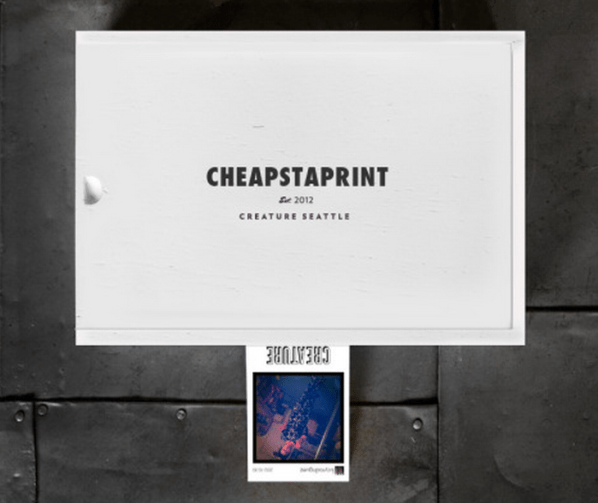
We’re using a Polaroid PoGo housed inside a cigar box. We used a Dremmel to route out a slot in the front for picture emission and a space for the power
cable to the side. The PoGo’s connected via bluetooth to an inconspicuous laptop nearby that pulls pictures from Instagram using our code and pushes them to the little printer. We chose the PoGo because we wanted little stickers, but the code works for any printer on your network. Ideally, we’d love people to be a little conceptual with this. Our personal favorite thus far is pictures of #rain falling out of a cloud.You will notice there’s a decent amount of empty space in that box though. We want to see if we can run this off a Rasperry Pi and remove the laptop/bluetooth portion from the equation by connecting via USB in the box. That way it’ll just be a stand-alone bundle with a single power cord.

48 thoughts on “Print Instagram Photos with Cheapstaprint”
Comments are closed.

ADVERTISEMENT
Join Make: Community Today




F
F**kin awesome.
Cool hack! Have you seen Static Pixels eco-friendly Instagram prints? http://staticpixels.com/deepsquare-instagram-prints/
Is there a step by step on using the Code or set-up? (not very good with code/coding/codes)
Thank you
How do you get the code to work? It seems to have all the right pieces, but for the life of me I can’t get it integrated into my system. PLEASE HELP!!!
Okay, after a few weeks of hacking at the code, I’ve fixed Cheapstaprint. Instructions and all necessary files are in this download: http://www.mediafire.com/?sahb0w14fzsrpuo
Turner, I was following your instructions but I’m on a mac. Do I need to switch it up or do you have any recommendations for an easyphp installer? I’ve got zero experience but the directions seem pretty straight forward plus I REALLY want to get this working.
Thanks.
To install the code on a mac you’ll need a local AMP server (there’s an easy to use one called MAMP here: http://www.mamp.info/en/index.html). For windows it’s called WAMP (or I like to use EasyPHP) and linux it’s called LAMP (or just installed the necessary Apache and PHP/PHP-GD programs).
This is so awesome. I just got this setup on my pc. I have to print manually since I don’t have a mac. Is there a pc way to automate that process? I changed the code around a little to call my own pictures up instead of certain tags. Is there a way to display hashtags and likes at the bottom instead of a logo? I’m a noob at this kind of stuff.
I’m currently working on updating the code to also include options for what to display on the footer (including comment text), the orientation of the display, how the new pictures transition in and so on. Look for an update in the next few weeks, right here :)
You rock! :) I’m excited.
I tried to get the web end of this running on a Raspberry Pi. I can get the initial index page to work and then it looks like it makes calls to instagram, but doesn’t pull in any images at all. What am I doing wrong? I’m a hopeless coder but would love this to work on the R-Pi.
The code over a git-hub doesn’t work. Use this one (http://www.mediafire.com/download/sahb0w14fzsrpuo/Fixed+Cheapstaprint.zip) and follow the instructions to get it working on your computer as a local server.
Were you able to update this code with “options for what to display on the footer (including comment text), the orientation of the display, how the new pictures transition in and so on”.
Let us know please. THanks
Yes, V2 of the Cheapstaprint fix is uploaded and ready for you HERE: http://www.mediafire.com/?s6t7sl576r226i2
DJ Turner, I have it working wonderfully with Instagram. Any way to add twitter?
Though that sounds like a fun idea, but twitter doesn’t have the constraints that instragram does (image size, user information, picture text, etc). So this means Twit-pics, vine and instagram video are out as well :(
V2 of the Cheapstaprint fix is uploaded and ready for you HERE: http://www.mediafire.com/?s6t7sl576r226i2
Please keep in mind that this HAS NOT been tested on Raspberry Pi. It uses a font that has emoji images to print smiley faces and such. More demanding font files, transitions and higher image resolutions have been known to crash using this with a Raspberry Pi. If it does not work for you, then the original V1 upload is probably best for you.
Hey Turner,
I got everything working just fine, but I want to change the size of the fonts on the final output image. Having some trouble with that. Can you help?
No worries .. I got it!
i’ve never coded before in my life… is there something i can follow to set this up? i have a mac…
thank you!
Hi,
Is there a way to limit the items to print by location? I know there is location ID field on the script but how do you use it?
I want to print only images with hashtag which is on my party. Some of my friends who are not in the venue also uses the hashtag and their pictures prints. event though they are not on the venue of the party.
Thanks
It would be nice if text and image can be added as footer. Is it possible to print photo of private profile? (with consent pop up to either allow or not)
Hi! I just tried running this on my Mac. I just encountered some road bumps. I am getting a “can’t open file” message on the bottom left of the browser. I am also not getting any photos in my Original_Instagram_Pictures folder and Completed_Pictures folder though the photos are flashing on my browser. Help?
Okay. It’s working now. Tried a different server :)