Vol. 25   Other Issues

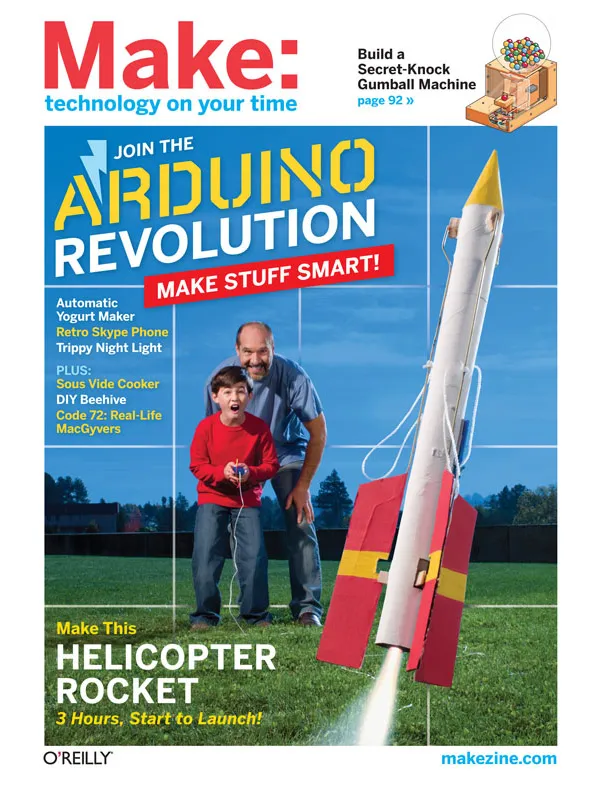
Make: Volume 25 Cover Image

Vol. 25: Microcontrollers and Arduino

Give your gadgets a brain! Previously out of reach for the do-it-yourselfer, the tiny computers called microcontrollers are now so cheap and easy to use that anyone can make their stuff smart. It's called "physical computing" -- with a microcontroller, your gadget can sense the environment, talk to the internet or other gadgets, and make things happen in the real world by controlling motors, lights, or any electronic device. The Arduino is an easy-to-use microcontroller board -- it's like an R&D lab on your kitchen table for prototyping any gadget. We show you how to make one, and how to use Arduinos and other microcontrollers to make an automatic yogurt maker, a vintage Skype telephone, a gumball machine that recognizes your secret knock, and more. Plus, make a Helicopter Rocket, portable solar power pack, gourmet Sous Vide food cooker, treadmill desk, and more fun DIY projects. On newsstands now! » BUY OR SUBSCRIBE


In This Issue


Table of Contents


blue pdf icon = PDF OF ARTICLE     red content icon = DOWNLOADABLE RESOURCES     orange content icon = SLIDESHOWS AND EXTRAS

Made on Earth

Icon for Slideshows and Extras Toothpick Artistry by Bruce Stewart
Using just small hand tools, enormous patience, and lots of toothpicks, Steven J. Backman creates amazingly intricate works of art. Page 18

Icon for Slideshows and Extras Quickup Camper by Jon Kalish
Jay Baldwin has designed and built a prototype for what he calls the Quickup Camper, a collapsible camper top that transforms a standard-sized pickup truck into a fuel-efficient, highly maneuverable recreational vehicle. Page 20

Invisible Sculpture by Thomas Walker Wilson
Artist Michel de Broin affixed pieces of mirror to a rock, maintaining its contours, until the rock's surface was entirely covered in mirrors. Page 21

Icon for Slideshows and Extras Tools of Artistry by Arwen O'Reilly Griffith
Chris Bathgate's intricate sculptures showcase the perfection of metal and the nuts and bolts of machining. Page 22

Icon for Slideshows and Extras Biker Laundry by Shawn Connally
John Wells' Bike-O-Worsher works just like any washing machine - you pedal forward for the agitation and pedal backwards for the spin cycle. Page 23

Icon for Slideshows and Extras Backyard in Motion by Laura Kiniry


Retired mechanical contractor Bill McHugh has spent more than 40 years creating fun kinetic sculptures that run on air, sun, water, birds, and most typically, squirrels. Page 24

Icon for Slideshows and Extras Cinema with Sol by Jerry James Stone
A tiny, solar-powered cinema is making its way across Europe, promising patrons an intimate movie-viewing experience and red-carpet treatment. Page 25

1+2+3

Urban Survival Button by Cy Tymony
Prepare yourself by making a Sneaky Button Survival Kit, which contains practical items you can use to protect yourself in urban situations. Page 40

Icon for Downloadable Resources PET Bottle Purse by Zitta Schnitt
Build a cool purse out of the bottoms of 2 PET bottles and a zipper. Page 80

Maker

Code 72 by Lee D. Zlotoff
Meet the real-life MacGyvers who engineer life-or-death solutions while the clock ticks. Page 30

Things of Science by Bob Knetzger
Miniature monthly science surprises! Page 36

SPECIAL SECTION: Special Section

Getting Started with Microcontrollers by Tom Igoe
Choose the right controller for your project and your skill level. Page 42

Icon for Downloadable Resources Vintage VoIP by Andrew Lewis
Convert a classic 1930s telephone into a Skype phone. Page 46

Icon for Downloadable Resources Drag-n-Drop Arduino Programming by Ed Baafi
Modkit makes microcontrollers easy for kids and anyone else. Page 52

Icon for Downloadable Resources Icon for Slideshows and Extras Yobot: Precision Fermentation by Chris Reilly
Build your own smart yogurt maker. Page 57

Icon for Downloadable Resources Icon for Slideshows and Extras Primer: Make and Use an Arduino by Dale Wheat
Build and program a microcontroller clone with no soldering. Page 62

Icon for Downloadable Resources Get in the Game by Tom Igoe
Make all kinds of game controllers using an accelerometer or other sensors. Page 71

Micromania
Everything Arduino: Resources, kids and parts, cool projects and people.

Swinging in the Rain
iPhone LED Suit
The Uberhoop
Foiled Again!
40 Top Projects
Mega Claw Grabs a Prize
Flying Wi-Fi Sniffer
Blu Robotics Kits
A Shield for That
Retro Gaming Future
TickTack3
Say You Want A Revolution
A-Blocks
Simon Says Solder
Ethernet Power
MAKE's Essential Arduino Site
Crash Course
The Cheat Sheet
The 1-Minute Microcontroller Page 74

Projects

Icon for Downloadable Resources Icon for Slideshows and Extras $5 HeliRocket by Doug Desrochers

Use toilet paper tubes, coat hangers, and rubber bands to build a high-flying model rocket that transforms into a helicopter midflight, then spins dramatically back down to Earth. Page 82

Icon for Downloadable Resources Icon for Slideshows and Extras Secret Knock Gumball Machine by Steve Hoefer
Make a cute candy vending machine that only dispenses treats when you knock the secret rhythm on its front panel. Page 92

Icon for Downloadable Resources Icon for Slideshows and Extras Sous Vide Immersion Cooker by Scott Heimendinger
I'm fascinated by sous vide cooking, in which foods vacuum-sealed in plastic are immersed in a precisely temperature-controlled hot water bath to achieve optimal doneness. Page 104

Welcome

The Little Engine That Could by Dale Dougherty
An Arduino board is cheap enough that you wouldn't feel bad breaking it, burning it up, or leaving it behind in a project. Page 10

In the Maker Shed

The MakerShield by Dan Woods
The ultimate open source prototyping shield for Arduino and Netduino microcontrollers. Page 11

Reader Input

Reader Input
Jailbreak catch-22, kids love robots, ladder logic, and space zillionaires. Page 12

Making Trouble

Icon for Slideshows and Extras The Art of Productive Procrastination by Saul Griffith
Flip between two projects to prevent focus fatigue. Page 13

Maker's Calendar

Maker's Calendar by William Gurstelle
Our favorite events from around the world. Page 15

Make Free

Untouched by Human Hands by Cory Doctorow
Is there a boardroom somewhere trying to figure out how to make your next Happy Meal toy, laptop, or Ikea table look like it was handmade by a MAKE reader? Page 16

Country Scientist

Capturing and Studying Airborne Dust, Smoke, and Spores by Forrest Mims III
In this column we'll experiment with the simplest air samplers, those that rely on gravity or wind to deposit particles in the air onto adhesive tape or a bare microscope slide. Page 26

Tales from the Web

The Computer with 1,000 Faces by Gareth Branwyn
Here are a few cool Arduino projects of staggering diversity from Make: Online. Page 29

Skill Builder

Holography by Frank DeFreitas
Capture magical 3D images without a camera. Page 116

DIY: Outdoors

Your Own Honey Cow by Abe Connally
Make a simple beehive and enjoy the sweet fruits of your labor. Page 123

Making a Cage Trap by William Gurstelle
Catch pesky animals humanely with a homemade slammer. Page 126

DIY: Imaging

Icon for Downloadable Resources Icon for Slideshows and Extras Laser Pointer Printer by James Underwood, Leland Sindt
A scanning laser "paints" on photo paper. Page 129

DIY: Office

LED Paper Cutter Assist by Larry Cotton
Modify an el-cheapo paper cutter to make it way more accurate. Page 133

DIY: Toys

Icon for Slideshows and Extras Giant Spin Art by Pete Goldstein, Bob Goldstein
Spin canvases at high speed and drop paint on them. Page 136

DIY: Home

Solar TV Remote by Sparkle Labs
Juice your flipper with sunlight. Page 138

DIY: Workshop

Faux Flames by William Gurstelle
Make realistic fake fire, using fabric, a fan, and some LEDs. Page 140

Make Money

Scrabble by Tom Parker
Sometimes it costs more to buy it than to make it from the money itself. Page 143

Build Notes

Icon for Downloadable Resources Reverse Geocache Puzzle Box by Mikal Hart
This locked gift box guides recipients to the only place on Earth where it will open. Page 144

Electronics: Fun and Fundamentals

Icon for Downloadable Resources A Trippy Crystal Nightlight by Charles Platt
Create any color, using 3 LEDs and the trick of pulse-width modulation. Page 148

MakeShift

Icon for PDF of Article Icon for Slideshows and Extras Zombie Attack! by Lee D. Zlotoff
Battle your way through brain-hungry zombies to arrive - bite free - to a secure school two miles away. Page 152

Howtoons

Icon for PDF of Article I made it. I can fix it. by Saul Griffith
The motto for the next generation of makers! Page 154

Toolbox

Toolbox
Build a village, clock your speed, wear sunglasses at night, craft a canoe, and geek out your garb. Page 156

Eureka!

Icon for PDF of Article Icon for Slideshows and Extras Eureka! by Roy Doty
Use your maker skills to ensure that your reserved parking spot remains yours alone. Page 158

Toy Inventor's Notebook

Amazing Maker Marble Maze by Bob Knetzger
Page 164

Dangerous Things

Lick a 9-Volt Battery by Julie Spiegler, Gever Tulley
Taste electricity. Page 166

Heirloom Technology

Carve Inscriptions in Stone by Tim Anderson
Send a message to eternity. Page 168

Remaking History

The Chinese Windlass by William Gurstelle
British soldiers, encamped on the outskirts of Beijing after the war, took note of an ingenious device being used to raise and lower drawbridges. Page 170

Homebrew

My Own Visible Computer by Kevin Quiggle
For my most recent PC build, I wanted to show the working parts as much as possible. Page 176

Downloads & Extras

All the stuff you need to build the projects in MAKE, and exclusive online features direct from the staff of MAKE.

Volume 29»  Volume 28»  Volume 27»  
MAKE: Amends for Volume 25 !

Where it appears: The Chinese Windlass, Page 171
The Error: Volume 26's Make Amends incorrectly corrected the equation values in Volume 25's Remaking History. Aargh! The crank length (a radius) is 6" as originally stated, but the radius of the large barrel is 1.5". The value of the expression is therefore 96, not 48.


 !

Where it appears: Sous Vide Immersion Cooker, Page 107
The Error: In Volume 25’s Sous Vide Immersion Cooker, page 107, we listed the wrong clear acrylic box from Amazon. The correct part number is #B000NE9VJE.


 !

Where it appears: Secret Knock Gumball Machine, Page 95
The Error: Secret-Knock Gumball Machine" (MAKE 25), on page 95, the part number listed for the clear plastic globe from 1000bulbs.com was incorrect and should have read #3202-08020.


 !

Where it appears: Primer: Make and Use an Arduino, Page 65
The Error: The second paragraph on page 65 should read: "To connect the chip to power and ground, jumper [...] J-7 to right ground, and J-9 to right power (Figure G)." The print version had power and ground reversed for pins J-7 and J-9. Figure G is correct.


Connect with Make


Other Issues


Make: Volume 29 Cover Image Make: Volume 28 Cover Image Make: Volume 27 Cover Image Make: Volume 26 Cover Image Make: Volume 25 Cover Image Make: Volume 24 Cover Image Make: Volume 23 Cover Image Make: Volume 22 Cover Image


Current Discussions

Join the conversation - many MAKE articles have an online page that includes a place for discussion.

Get in the Game -- game controller
First of all, let me say thanks to Tom for writing this article. I am so new to this sort of thing,...

The Luna Mod -- LunaMod goes into beep mode
Hello, I've finally finished my LunaMod and have a weird problem. The Picaxe code loaded correct...

My Robot, Makey -- Makey the robot
can Makey the robot work with also arduino UNO?...

Zombie Attack! -- Zombie Survival Science Fair
Awesome, Ian! Can't wait to see what you come up with! ...

Zombie Attack! -- Zombie Survival Science Fair
Hi, Im Ian and I have been looking in all the make magazines I have for an idea for my grade 9 scien...

Make:Projects
A How-to Projects Community for Makers

Arduino
All You Need to Get Started with Arduino & More!