





Clicky is overrated

Cover of Make: Volume 99. Headline is "Get on Board". Arduino Ventuno Q, M5Stack Cardputer Zero, and Seeed Xiao ESP32-C5 are featured. The DIY XGO-Duck robot is inset on top.
This article appeared in Make: Vol. 99. Subscribe to Make: for the latest articles.

When it comes to video games, everyone defaults to mouse and keyboard, touchscreen, or a joystick and a few buttons.

I don’t know about you but I yearn for different types of interactions. Weirder ones.

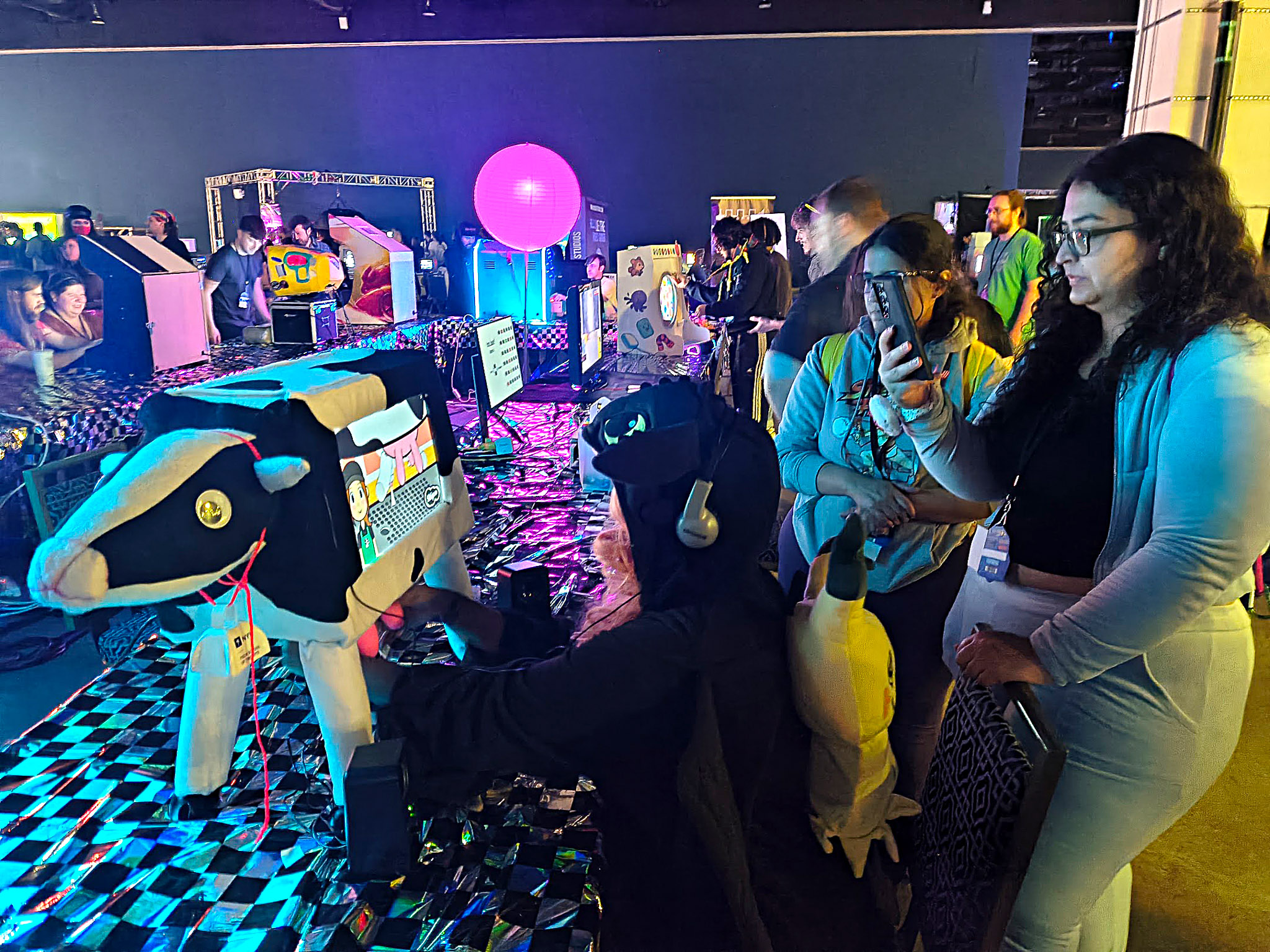
In 2023, I was taking a class at NYU called the New Arcade, taught by the founder of Wonderville arcade in NYC, Mark Kleback. Our midterm assignment was to make a game in Unity with an accompanying alternative controller.

My artistic practice up to that point included soft materials through cosplay costumes and props. With this in mind, I realized that there aren’t too many examples of soft, squishy video game controllers. Why not make a cow udder video game controller in which each of the four teats is like a button or key press?

What I ended up making was a miniature cow arcade cabinet, with a Rhythm Heaven Fever-inspired rhythm game called Udder Mayhem. Yes, that’s right, you have to squeeze teats to the beat! Just the level of silliness I strive for.

I tried a lot of ideas to detect a teat squeeze, including conductive fabric, resistive stuffing, a microphone and straw, and Hall effect sensors. For the Hall effect sensors, I embedded the magnets into the silicone during casting and taped the actual sensors inside a thin metal tube at the center of each teat. I thought it was a really clever solution, but the main issues I ran into were that the magnets and sensors must be very well aligned to physically register and, after many squeezes, the tube inside would sometimes displace slightly. That, and you could actually feel the tube when you squeezed, which wasn’t ideal. Removing the tube and just casting the sensor directly into the foam introduced many alignment issues and made servicing harder.

It was my favorite solution — until I discovered force-sensitive resistors.

NOTE: For educational use only.

Materials.
Photography by Karina Chow.

Project Steps

3D Print the Parts

You can of course create your own silicone controller in whatever shape you’d like, but for this demonstration we will start with the udder model I created for my game. Be sure to print both the outer shell, the insert, and four teat insert rods.

The singular mold requires a print bed of at least 166 (length) × 209 mm (width) × 146mm (height).

If you don’t have a printer that large, I have a 4-part mold as well that should fit on most printers, but using it for the silicone cast will likely create visible seams.

Photo Courtesy of Karina Chow.

Even if you plan to use the singular mold, you need to print both because the 4-part mold will be used for casting the foam inside as well.

I recommend printing at a fine quality (~0.16mm) to increase the quality of the cast, but with a very low infill (~5%). It’s not a functional part, so no need to waste filament on the solid parts of the mold boxes.

There’s also an additional part in the repository that’s optional but helpful: a top brace for assisting in casting the foam as well as helpful for mounting the completed udder to a board later.

Prepare the Mold

The mold is a two-part mold with an outer shell as well as an insert and four poles, one for each teat. To ensure the silicone cast is easy to remove from the mold, use a mold release spray like Mann Ease Release 200. Shake and generously spray this on the inside of the main mold box (whether the singular or the 4-part) and also on the outside of the insert and poles. Remember to wear a mask and spray in a well-ventilated area!

Then, put the insert into the mold box. It should sit perfectly on top, with the tab holes of the insert aligned with the holes in the mold box for screwing in M3x10 screws. As the silicone cures, it can sometimes push up the insert a little bit causing it to misalign. It’s nice to have it screwed in.

Take each of the four poles and push them into the holes. They might require a little bit of twisting but ultimately you should be able to just push them in. Rotate and push them at the end until the hex heads lay flat on the insert.

Color and Mix the Silicone

Smooth-On Dragon Skin 20 Mold Making Silicone Rubber is a great beginner pouring silicone because it’s an easy 1:1 ratio by weight or volume and it has a fairly quick pot and cure time. It’s a silicone with a Shore Hardness of 20A, typically used for masks and prosthetic props that need to be soft and fleshy, perfect for a cow udder!

Put on your vinyl gloves and get your clear mixing containers. You will need nearly the entire Trial Unit sized package. I like to pour portions of the parts (200-250mL) into smaller cups at a time for easier mixing.

I mixed Kryolan Fair for a base cow fleshy color and Smooth-On Silc Pig Electric Pink for more of that fluorescent cartoony pink. A little goes a long way for these pigments. For the specific color I had, start with about 30 drops of the Kryolan Fair pigment into Part A.

Once you get to a good base, mix in a tiny amount (think: pinky nail amount) of the Smooth-On Electric Pink. Add more or less as you see fit, but remember that the color will be a little diluted when you add part B!

Once you’ve reached a consistent, desirable color, grab your third, larger container. Pour in and stir the two parts together. If you’re using Dragon Skin 20, you have a 25 minute pot life so you can take your time doing this. Minimize bubbles as best as you can. If you have access to a vacuum degassing chamber, even better!

Note: If this is your first time using silicone as a medium, I would highly advise Smooth-On’s tutorial videos on YouTube, as well as referring to the documentation that comes with the product.

Why Smooth-On Silc Pig Electric?
The bonus for the Electric series of pigments from Smooth-On is that they are bright under ambient and UV light, which is great for a controller for an arcade cabinet in a dark room.

Pour the Silicone

The insert has four channels, one for each teat quadrant.

Pour the silicone into each quadrant until it’s filled to the top and rotate it to fill the next, like decorating a cake on a turntable. By the time you rotate and get back to your first quadrant, the silicone should have already seeped through the channel and into the mold so you can pour again.

Keep doing this until either you’ve used all the material or the channel itself is full and it starts overflowing.

Now let it sit and cure for four hours.

Demold the Silicone Udder

After it’s fully cured, use whatever plier-like tool you have handy to get a good grip on the hex shapes at the top of the poles. Once again, you should be able to just twist a little and pull out. It will likely make a loud pop sound, similar to opening a champagne bottle!

Unscrew the M3 screws and begin to remove the insert. It can sometimes be a really tight fit, so you might need to use something with a flat head, like a screwdriver, around the edges against the mold box to loosen it up a bit. You might have to break parts of the insert in order to remove it from the silicone, depending on how much mold release spray you sprayed on.


If you have one, using a vice to hold onto the mold box as you yank on the insert could be helpful here. Carefully pull at the base of each teat to remove.

If there’s any stray silicone from over pouring, you can simply cut it off with normal scissors.

Make the Circuit and Test the FSRs

Download the test file fsrTeatTest.ino and wire up the FSRs. Typically you want one lead connected to an analog input pin on your microcontroller alongside a pull-down resistor to ground while the other lead just goes to 3.3V.

In this particular example, I used 5.1kΩ pull-down resistors, but you can use anything between 4.7kΩ or 22kΩ. I’d recommend going on the lower end because it biases toward sensitivity at heavier forces, and these will be encased in foam that will always be exerting a little pressure on them. We want more signal for squeezes and less chance for false positives from gentle pressure from the foam itself.

NOTE: The connections for most FSRs are rather fragile. That’s why I recommend using something like the Amphenol FCI Clincher Connectors to make the connectors more robust. These connectors make it much easier to solder wires to the FSRs or to use jumper cables. See the middle of Sparkfun’s SoftPot guide for more details.

NOTE: To learn more about FSRs and how to wire them up, I recommend reading this FSR tutorial on Makerguides.

Make your circuit on a breadboard and connect each of the FSRs. I used color-coded jumper wires to keep track of each, and the sample code will print the values for each color. Change it to whatever system makes sense to you!

The FSRs will ideally output a value between 0 and 1024, with 0 being no pressure applied and any number higher an indication of how much pressure is being applied.

Casting the Foam Interior

Now comes the trickiest part of this entire project, casting the FSRs in the interior foam.

Smooth-On makes a range of flexible polyurethane foams, each with a different density. I’ve used the X series (denser, think a firm furniture cushion) and the III series (much lighter, think the stuffing in a floppy stuffed animal). This demo uses Series III, which cures in 2 hours but gives you a tricky 35 second pot life (woof!). If you’re newer to casting, I’d recommend the X series because it’s much less prone to failure. Any foam works; just swap in the measurements and timings from its product specs and the method stays the same.

FlexFoam-iT! III is a 1A:2B volume ratio. Mixed aggressively enough it can expand up to 15 times its volume, though I typically see 8-10 times. The inside of the udder is around 700cm3, so assuming a conservative 7× expansion, we need 100mL of mixed foam. That overfills on purpose, which is what the top brace is for.

35 seconds is nowhere near enough time to mix 100mL and place four sensors, so we’ll do this in two pours of 50mL each.

For the first pour, measure 16.6mL of part A and 33.3mL of part B. Aggressively stir each part on its own, then combine them and mix very aggressively for about 15 seconds. Now move fast: pour a quarter of the mixture into each teat and press a prepared FSR down into each one through the rising foam.

Orient them so that when you squeeze a teat, your non-thumb fingers land flat against the face of the sensor.

Once all four are in, use both hands to push them down and hold them there for 3–5 minutes. The expanding foam will try to carry the FSRs back out of the teats, but after a few minutes their positions start to solidify. Keep the wires pointing straight up so they don’t get cast into the foam too!

For the second pour, repeat with the same amounts (16.6mL of part A and 33.3mL of part B) and pour straight into the center of the udder. It will expand and chemically join with the first pour, creating one singular unit. Monitor for another five minutes, making sure the FSRs stay put and the wires stay free.

Now strap the top brace on with a mold strap or a belt. The brace keeps the expanding foam from overflowing, so instead it will migrate into the rest of the udder and give you a fuller cast.

Check in every ten minutes or so for the first hour of cure time, then let it sit and do its thing!

Testing

After curing, squeeze each teat and see how they feel! Because the FlexFoam-iT! has a very short handling time before expansion starts, it’s possible that there are huge gaps. It might also be possible to mix some more and fill those gaps depending on where they are.

Connect your wires to your breadboard and see how the readings look. Prior to the foam casting, mine ranged from a baseline of 0 to around 400, but afterward I had a baseline of around 50–100 for each and went up to ~800. Each FSR might also have a slightly different baseline and threshold for squeeze, depending on how it got cast within the foam; sometimes they bend a little, sometimes one teat is a little more dense than another, etc.

Notes on Mounting

If everything is working as you expect, it’s time to mount the udder for use!

This udder model assumes it will be mounted on a ¾" board with M6 screws. I have an example here of what my board looks like. In the GitHub repository, you’ll find an EPS defining the hole shape and screw locations for the udder.

I cut the mounting board out of MDF and put threaded inserts in for where the screws will go. From there you can build your cow controller/arcade cabinet in any way you’d like!

Making the Udder a Custom Keyboard

The microcontroller I used was a Teensy 4.1. Teensy boards natively support emulating keyboard key presses and tend to have more RAM and flash memory than basic Arduinos, resulting in lower latency and greater responsiveness, which is great for controllers. You’ll want to download the Teensy loader app.

In Arduino, you can go to Tools → Board → Board Manager to install “Teensy by Paul Stoffregen.” You can then go to Tools → Manage Libraries and install the Keyboard by Arduino library.

When you change your board to your Teensy version in Tools → Board, you will now also see a lot of Keyboard options in Tools → USB Type. I would say in most Arduino projects, the default we normally use is USB Type → Serial for serial communication, but here we will be using the Keyboard library to press keys.

Tool settings in the Arduino IDE GUI. Note how USB Type is “Keyboard” instead of “Serial”

The Keyboard library doesn’t need to be imported directly at the top of your sketch as long as it’s set up as the USB Type; it’ll be recognized, just as Serial doesn’t have to be imported. Then you can just use utilities like Keyboard.press() and Keyboard.release() on key constants.

You can refer to docs.arduino.cc/language-reference/en/functions/usb/Keyboard for the available methods. You can either use a constant (e.g. KEY_A) or the actual character in single quotes (‘a’). e.g. Keyboard.press('a');.

Then, over a USB connection, squeezing a teat should press the character you chose. For letting go of the teat, you can put in a Keyboard.release(KEY) such that as long as you are holding a teat it repeatedly types the character until you release.

Conclusion

This project has been an absolute joy for me to work on, and people are really drawn to its silliness. After trying everything from Hall effect sensors in the center of each teat with magnets embedded in the silicone to rods in the teats that smack buttons at the top of the udder, this iteration using FSRs is the most robust yet.

The next iteration I’d like to try is to make each teat work like a Panic Pete squeeze toy; using air displacement from squeezing it to pop out a peg that hits a button above. Then it would be a binary input device rather than an analog, and potentially not suffer from foam compression over time.

I’m excited to try this next method and to continue exploring soft alternative controllers. Please reach out to me @karomancer on X or @karinamakes on Instagram if you have any questions or want to show me the version you made!

Photo Courtesy of Karina Chow

This article appeared in Make: Volume 99.