









How to run homebrew on 1.5 PSPs
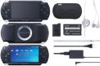 Several sources are reporting that it does indeed work. You’ll need to do some funny trick with swapping Memory Sticks (so you do need two of them) and modifying the PBP file of the homebrew application you’re trying to run, but when all is said and done it will hopefully work for you. All necessary files, including a tutorial, are available… Link. Bonus link: PSP MAME is updated.




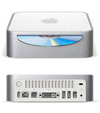 The Nerd Vittles staff will be taking a breather for a bit to recharge our batteries. But, in the finest college tradition, we’re leaving you lots of homework. Here’s a listing of what we’ve built thus far in our Mac mini ISP-In-A-Box project. So, while we’re taking it easy, pick out a few projects you haven’t tried and knock yourself out. Any Mac running at least Mac OS X v10.3 aka Panther is a suitable candidate for these projects. Many also have been tested with Tiger.

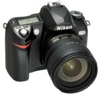 Great article on Digital SLRs- Digital single-lens reflex (SLR) cameras are the standard tool for serious photographers. With the recent introduction of cameras such as the Nikon D70s and the Canon Digital Rebel XT the market for digital SLR cameras has expanded tremendously. A point-and-shoot compact digital camera can offer reasonably good image quality but a digital SLR, which usually looks a lot like an old standard 35mm film camera and may use the same lenses.
 KnoppiXMAME is a bootable CD/DVD image with hardware automatic probing and configuration for playing MAME games. No games are included, but they can be added to the ISO image, as well as new versions of X-MAME, gxmame, and the Linux kernel. If you’re interested in carrying around a CD that can boot just about any computer and turn it in to a retro arcade machine, check this out.