 Steve writes in with his progress on making an iPod breakout box with some new BASIC stamp action – “Work on the iPod breakout dock continues, and I have achieved reletively painless interaction with a BS2 microcontroller. This simple starter circuit has a single push button, an LED to let me know I am actually pushing the button…This small step, along with the iPod code generator I released previously, opens the doors to more complex interaction. In my case, there will be another device attached downstream, but that will have to be explained at another time.” Link.











 Hans writes “Laser Chess was created by Mike Duppong back in the late 80s, and you can find lots of software versions of the it on the web. However, a Brazilian student named Alexandre Van de Sande actually made a actual working laser version of the game!” Link.

 Lilmuckers details his installation of a Mac mini in a kitchen “My father wished to install a computer in the kitchen, hidden, and with few to no visible cables. Encorperating a TV into the setup somehow. The kitchen had been recently overhauled, tiled, plastered, and cleaned up. So I had a blank canvas to work from.” [
 Great (old) project from Rocketboom’s Andrew – “This project was designed to create an isolated box which can be placed inside of an elevator to play dramatic sound designs based on the direction and altitude of an elevator. A microprocessor chip is stamped with conditionals to determine the location of the elevator based on barometric pressure and then pulses are sent to trigger an mp3 player which, when amplified, plays out from a complex set of musical relationships to create a dramatic and playful experience for the unassuming passengers.”
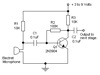 Pretty good list of some starter circuits for many projects…“a list of the top ten most needed circuits that are a must know for anyone interested in DIY projects. These are the basics that can all be interchanged and used in conjunction with each other to make many of the projects that we all love so much.”
 Great how to on detecting a laser pointer “break” using a serial port – Chard writes “Ever wanted to make your own laser beam security system. You know the kind they have in the movies, with dozens of lasers and the thief has to limbo through them. Well, I just made a simple laser beam break detector. My computer can now tell when the beam is broken. The parts I used are: 5.6k resistor, photo diode, Digikey part #PDB-V107-ND, serial port from my PC…”
 CMPalmer writes “This may be old hat to most, but I’ve posted an example of using GPS tracklogs and Google Earth to virtually recreate vacation trips. I uploaded the GPS tracks into Google Earth so I could visualize them. One of the coolest tricks that Google Earth does is to let you “fly” along the tracks at any speed and altitude that you wish, so I can virtually recreate each drive over 3D scenery overlayed with satellite photos. This would have been great to do real time while I was there, because I was extremely frustrated to find that I had missed wonderful things that I drove right by or were just a few blocks away from.”