









HOW TO – Modify Modem to Control Appliances
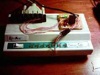 Andrew writes- “I started this project when I had an idea to use a Mac to switch a solenoid on/off to control sprinklers around the house. Unfortunately I never took it that far, but I have been able to control a few other things, like a model train around the Christmas tree. Here I have documented how I did it.” Link.

 MAKE was nominated in the best crafts blog category for the 2006 bloggies. Thank you so much to everyone out there who nominated us, and now that we’re up there – head on over and vote for MAKE! Today is the last day to vote!
 One download and you’re set – “Download TorPark for your language, and put it on a USB Flash keychain. Plug it into any internet terminal whether at home, school, or public. Run Torpark.exe and it will launch a Tor circuit connection, which creates an encrypted tunnel from your computer indirectly to a Tor exit computer, giving the appearance of having the Tor exit computer’s IP.” [


 Here are a ton of PC joystick interface circuits “Fake Joystick circuit, the wire between multi-IO card and joystick connector, adding second joystick to PC joystick interface, Y-cable problems with soundcards and how to solve them, soundcard joystick port problem solver, build your own joysticks and controllers , convert Atari-style joystick to PC joystick port, use PC joystick port to measure temperature and light levels, connect other circuits to PC joystick port , using the joystick port as general purpose input .”
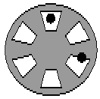 Greg from DIY has some tips on mouse modding “…there may be some interest in modding a mouse, so it is important to understand how they work. You may want to control the cursor for some sort of a project. A rollerball mouse has has a ball that rolls on the desktop when you move the mouse. This movement turns a wheel that has small spokes in it. There are two different infrared LEDs, and two different infrared detectors per wheel, and there are two wheels per mouse. One wheel controls up and down, and the other one controls left and right.”
 If you know Flash, you can make games for that slick little U10 “The iRiver U10 is a new portable media player from Reigncom Ltd. whose entire user interface is implemented in Flash Lite 1.1. This means the player itself is embedded in the operating system. The device has the ability to play back Flash SWF files that you transfer to the device using the included USB cable. The device’s unique form factor and UI make it particularly well suited for simple Flash games. The device has a four-way navigational control built into the display screen. To press Up, Down, Left, or Right, you actually squeeze the edge of the screen, which produces a slight tactile click and sends a keyPress event to the Flash Lite player.”